 leafovers
leafovers
leafovers
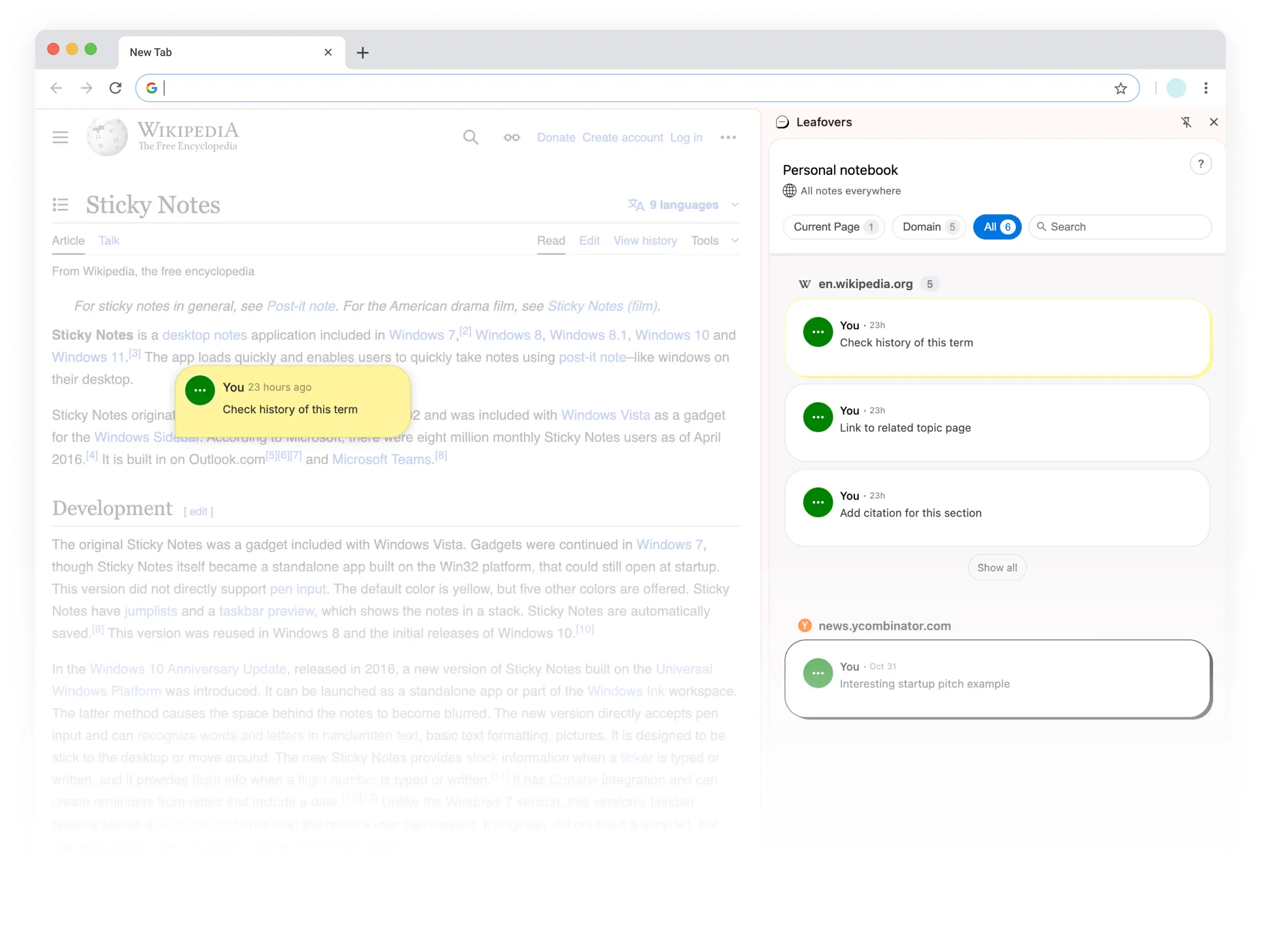
Turn every website into your personal notepad. Pin sticky notes in your favorite colors, keep ideas organized, and revisit them anytime. Perfect for research, reminders, or simply keeping track of thoughts while you browse.
Right-click anywhere on a web page to leave a note
Start using Leafovers immediately after installation
Pick from beautiful note colors — or go Premium and paint notes any color you like, with custom icons to match.
Stick notes to specific elements on the page or keep them fixed on your screen.
Keep notes always visible or hide them until you hover. Reduce clutter while keeping important information accessible.
In the notebook panel you can find and manage all your notes
Choose between light and dark mode to match your environment, reduce eye strain, and personalize your note-taking experience.
Tag your notes with labels and filter them later to keep everything neat and searchable.
Sign in with Google to keep your notes backed up and synced across all your devices.
Unlimited notes, any note color, custom icons, and priority support — from $1.99/month. See pricing.
Start free. Upgrade when your notes outgrow the free plan — cancel anytime.
 Add to Chrome
No! Leafovers works instantly after installation. Your notes are stored locally in your browser, so no sign-up is required.
Yes. Your notes are stored locally on your device. If you sign in to enable sync, they're also stored securely on our servers — and never sold, shared, or used for advertising. See our Privacy Policy.
Currently, Leafovers is available as a Chrome extension for desktop browsers. Mobile support is planned for future updates.
Yes — sign in with your Google account and your notes are backed up and synced across all your devices automatically.
Yes — the free plan includes up to 10 notes and all core features, no credit card required. Leafovers Premium ($1.99/month or $19.99/year) adds unlimited notes, custom note colors and icons, and priority support.
Premium subscriptions are processed securely by Stripe. Your card details never touch our servers, and you can pay monthly or yearly.
Anytime. Open "Manage subscription" in the extension to cancel with two clicks — you keep Premium until the end of the period you've paid for, and your notes are never deleted when you downgrade.
Yes — if you're not happy with your first Premium purchase, email us within 14 days for a full refund, no questions asked. Accidental renewals and billing errors are refunded too. Details in our Terms of Service.
Simply click on any note and you'll see options to edit, move, or delete it. You can also manage all your notes from the notebook panel.